
If you have a soundbar and you stream, plug it into the HDMI port marked ARC or eARC and stop thinking about it. That answer covers most Melbourne living rooms.
The reason the question keeps coming up is that "does it do Atmos?" has two different correct answers depending on where the Atmos came from, and almost nothing you read says so. Here is what each connection can actually carry, and when the difference is worth caring about.
The short answer
- ARC and eARC both send sound back down the same HDMI cable that carries the picture, so one cable does everything.
- Optical carries stereo and Dolby Digital 5.1, and nothing above that.
- Streaming Atmos usually works over plain ARC. Atmos off a Blu-ray disc does not.
- eARC matters if you have a disc player or a receiver passing lossless audio. For streaming, it changes very little.
- Optical still wins in two situations, and one of them is a hum you cannot get rid of.
What each one can actually carry
| Optical | ARC | eARC | |
|---|---|---|---|
| Stereo and Dolby Digital 5.1 | Yes | Yes | Yes |
| Dolby Digital Plus, the streaming Atmos | No | Usually, on recent TVs | Yes |
| Dolby TrueHD and DTS-HD, the disc formats | No | No | Yes |
| Uncompressed 5.1 and 7.1 | No | No | Yes |
| Volume from the TV remote | No | Yes | Yes |
| Soundbar wakes with the TV | No | Yes | Yes |
| Cannot carry a ground loop | Yes | No | No |
The bottom three rows are the ones people forget. Optical carries sound and nothing else, so the soundbar will not turn on with the television and the TV remote will not change its volume. That is not a small thing to live with every day.
The Atmos question has two answers
Dolby Atmos is not one thing on the wire. It travels inside whatever format the source is using, and the two common formats are very different sizes.
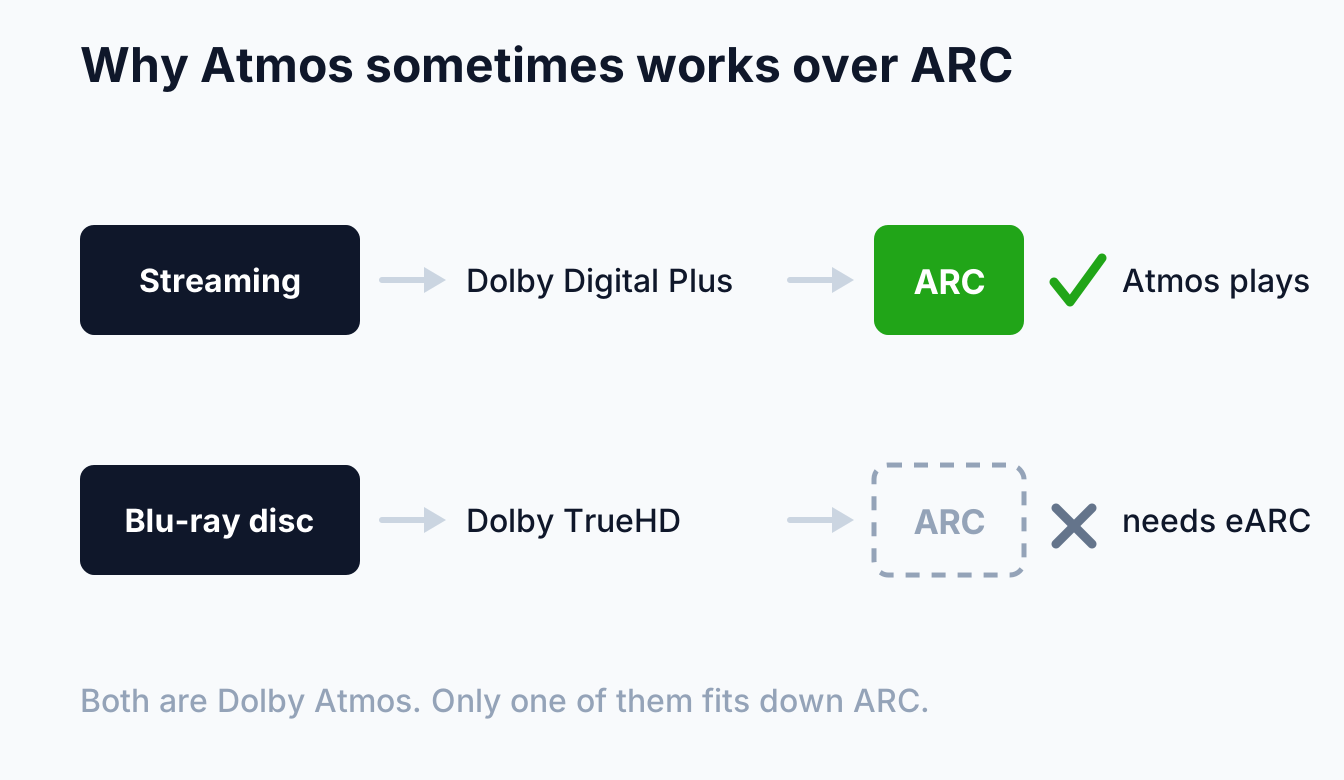
Streaming services deliver Atmos inside Dolby Digital Plus, which is compressed enough to fit down a plain ARC connection. Dolby notes that most recent televisions support Dolby Digital Plus over ARC, which is why an Atmos soundbar on a modern TV usually just works.
Discs are the other case. Dolby is direct about it: HDMI ARC does not have enough data capacity to carry Atmos encoded in Dolby TrueHD, which is the format used on Blu-ray and UHD Blu-ray. Same badge on the box, different amount of data, different answer.
eARC exists to remove that limit. The HDMI specification for the enhanced audio return channel carries up to 192kHz and 24 bit, uncompressed 5.1 and 7.1, and the object-based formats including Dolby TrueHD, Dolby Atmos, DTS-HD Master Audio and DTS:X.
So when does eARC actually matter?
Less often than the marketing suggests, and it is worth being blunt about that.
It matters if you play Blu-ray or UHD Blu-ray discs and want the lossless soundtrack, if you have a games console or receiver sending uncompressed multichannel audio to the television, or if you are building a system where you would rather not think about format limits again.
It changes almost nothing if everything you watch arrives over the internet and through the television's own apps. In that case the audio is Dolby Digital Plus either way, and ARC carries it.
So eARC is not a reason on its own to replace a television or a soundbar. It is a reason to check before you buy, and a good reason to use it when you already have it on both ends.
One practical catch: eARC needs the cable to keep up. If you are running a new one, particularly inside a wall, use a certified Ultra High Speed HDMI cable and be done with it.
Where optical still wins
Optical is the oldest of the three and it is not dead, for two reasons that matter in real houses.
It cannot carry a ground loop. Optical sends the audio as light, so there is no electrical connection between the two devices at all. When a system has a persistent hum that follows the audio path, moving that link to optical sometimes stops it outright. That is a genuinely useful trick and it is the one thing optical does that HDMI physically cannot.
It does not join the CEC conversation. HDMI's control channel is what makes devices wake each other and switch inputs, and it is also what makes some systems behave unpredictably. If a soundbar keeps turning the television on, or an input keeps changing by itself, an optical link takes it out of that conversation entirely. We go through why that happens in our guide to smart home and home theatre integration.
It is also the answer for older equipment with no ARC port at all, and for connecting a television to something that only has an optical input.
How to check what yours is doing
Three checks, none of which need a technician.
Look at the port. On the back of the television, one HDMI port is labelled ARC or eARC. Only that one returns audio, and plugging the soundbar into the port beside it is the most common reason none of this works.
Look at the soundbar. Most display the format they are receiving. If it says PCM when you expected Atmos, the television is converting the audio before it sends it, which is a settings problem rather than a cable problem.
Look in the television's audio settings. There is usually a digital audio output option set to PCM, Auto or Passthrough. PCM converts everything to plain stereo or multichannel and throws the Atmos away. Samsung's Australian support pages walk through enabling eARC on their sets, and other brands bury it in a similar place.
When the sound does not come through
In the order we check it.
- Wrong HDMI port. Move it to the one marked ARC or eARC.
- HDMI-CEC turned off on the television. ARC depends on it, and every brand calls it something different.
- The digital output set to PCM rather than Auto or Passthrough.
- An old or unmarked HDMI cable, particularly for eARC or a long run.
- The soundbar set to the wrong input, which is easy to do and easy to miss.
If it worked yesterday and not today, start with the television. A firmware update resetting an audio setting is more common than a cable failing.
Frequently asked questions
Is eARC worth upgrading my TV for?
On its own, no. If you stream everything, ARC already carries what you are watching. If you play discs and want the lossless soundtrack, eARC is the difference, and it is worth specifying on your next television rather than buying one today for it.
Can I use ARC and optical at the same time?
Some televisions will output to both, most will not, and there is rarely a reason to. Pick one, and pick HDMI unless you have a specific reason not to.
Why does my soundbar say PCM instead of Dolby?
The television is decoding the audio and sending it on as plain PCM. Change the digital audio output from PCM to Auto or Passthrough in the TV's sound settings.
Does a more expensive HDMI cable improve the sound?
No. Digital audio either arrives intact or it does not. What a certified cable buys you is reliability at higher bandwidth, which matters for eARC and for long runs, not a better sound from the same data.
My TV has no ARC port at all. What now?
Optical, and it will do stereo and Dolby Digital 5.1 perfectly well. You lose the remote volume control and the automatic power, which is the real cost rather than the sound quality.
The honest summary is that the connection is rarely the thing holding a system back. Get the soundbar in the right port with the right output setting, and what you hear is decided by the speakers and the room rather than the cable. If you are still choosing the system itself, our comparison of soundbar against 5.1 and 7.1 comes first, and the setup checklist puts all of it in order. We install and set up home theatre across Melbourne and the Mornington Peninsula, so have a look at our home theatre installation page or book a free onsite quote.